How to Use
Since PCS uses the Avatar Contact system for detection. Therefore, you must enable player-to-player contact permissions in the game setting menu. Otherwise, PCS will not work!
By default, the system can detect penetration or interaction with SPS Plugs and the avatar’s hands. If you would like PCS to detect interactions with other objects beyond these, please refer to How to Add Contact
1. Setting Avatar Interaction
These are the required in-game settings that must be configured to enable the Avatar Contact system.
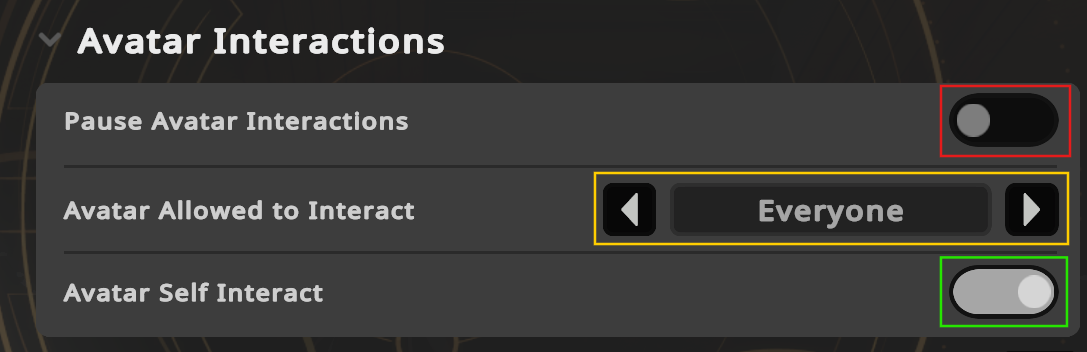
- Pause Avatar Interaction >
OFF - Avatar Allowed to Interact >
Friends, Everyone - Avatar Self Interact >
ON
2. Enable PCS
- Go inside the PCS menu and toggle
ONthe menu named ON/OFF - Select the sound in the Sound & Location menu as you like to use.
- Only one sound or location can be selected at a time.
- The sound and locations are linked, unless you use the custom position menu to override them.
- Getting penetrated from a hand (finger) or SPS Plug to generate sounds.
If you are in the Insertive Role (the one who performs the movement), you can use Self-Service mode for easier triggering. This menu allows you to generate sounds based on your own movements, even without interacting with another person.
Explanation of Expression Menu
| Image | Description |
|---|---|
 | On/Off This is the master switch to control all functions. Disable this will stop all functions |
 | Self-Service When Self-Service is enabled, your avatar will stop responding to actions from others and will only react to your own movements. With this, you can also generate sounds even without interacting with another person. |
 | Smash Hit This menu is used to enable or disable body impact sounds. |
 | Self-Touch This menu controls the self-interaction feature. When enabled, the avatar owner can trigger sounds through self-contact, generate sounds from owner's fingers or toys. When disabled, the owner will not be able to touch themselves. Other players will still be able to interact with you. |
 | Auto-Detect When this menu is enabled, PCS will automatically switch the sound & location menu where the interaction is currently occurring. |
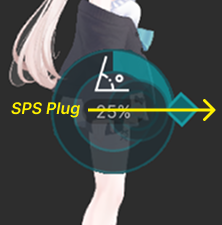 | Detection Offset This menu allows you to rotate the detector to different angles. It is highly useful in practice, especially if you experience detection interruptions while performing complex poses, such as standing sex positions, which increases the chance of detection failure due to front-back movement that does not align with the direction of the hole (up-down). |
 | Force Orgasm This button will instantly trigger climax event for your avatar, playing the corresponding fluid sound, voice, and visual effects. If you enable the Lust Feature, your arousal value will also be automatically set to maximum. You can also hole this menu to perform endless squirt. |
 | Squirting When this menu is enabled, every penetration — whether by fingers, a Plug, or any custom interaction with PCS — will trigger the fluid effect in sync with the motion. |
 | Edging (Stop Lust) When this menu is enabled, PCS will temporarily stop increasing the arousal value. Regardless of any interactions, the arousal level will remain fixed. |
 | Voice This menu is used to enable or disable moaning voice. Only if you use Voice Pack, this option will be shown in the menu. |
 | Reset This button is used to reset the entire system. It also resets the arousal value back to 0, allowing you to start again after a climax. |
When using a futa avatar (an avatar with penis and pussy), PCS may eventually become interrupted and stop generating sounds.
This happens because PCS can detect the owner’s own SPS Plug. Setting the Self-Touch menu to OFF will resolve this issue.
Sound & Location
This is a sub-menu used to switch the detector position. Only one sound type and position can be active at a time, why? The available menu options will reflect the configuration you selected during the setup process. If you have added additional positions (Custom Positions), the menu names you assigned will appear in this sub-menu.
| Image | Description |
|---|---|
 | Mouth This menu is used to enable oral sounds. When activated, PCS will reposition itself to the mouth area. |
 | Boobs This menu is used to enable paizuri sounds. When activated, PCS will reposition itself to the boobs area. |
 | Pussy This menu is used to enable vaginal sounds. When activated, PCS will reposition itself to the pussy area. |
 | Ass This menu is used to enable anal sounds. When activated, PCS will reposition itself to the ass area. |
 | Custom Position This is a special menu called Custom Position. It overrides the default PCS position and replaces it with its own custom location — for example, the hand. |

To use custom position menu, first select the desired sound, then choose the corresponding custom position. - For example, the Mouth menu normally plays suction sounds at the mouth area. If you also select Right Hand, PCS will be moved from the mouth to the hand instead. As a result, the suction sound will be triggered at the right hand rather than the mouth.